
Checking your Tesla battery health is essential for maintaining long-term vehicle performance and resale value. By using built-in diagnostic tools, third-party apps, and smart charging habits, you can accurately monitor capacity degradation and keep your EV running like new.
So, you are driving your Tesla down the road, enjoying that instant torque and the quiet hum of the electric motor. You start to wonder: how is the heart of my car doing? As we head into 2026, electric vehicle technology has become incredibly reliable, but the battery remains the most important component. Knowing how to check Tesla battery health is a smart move for any owner, whether you are planning to keep your car for a decade or looking to trade it in for the latest model.
Many drivers worry that their battery is failing because they see a slight drop in range compared to when the car was brand new. In reality, most Tesla batteries are built to last for hundreds of thousands of miles with very little degradation. This article will walk you through the simple steps to monitor your battery health, explain what the numbers actually mean, and share some expert tips to keep your range high for years to come.
Key Takeaways
- Understand Degradation: Tesla batteries naturally lose a small percentage of capacity over time, but healthy charging habits can significantly slow this process.
- Use Built-in Tools: The Tesla Service Mode provides a deep-dive diagnostic menu that allows owners to run a health test on the high-voltage battery.
- Third-Party Apps: Apps like Tessie or Scan My Tesla offer detailed real-time data that goes beyond the basic dashboard information.
- The 80% Rule: Keeping your battery between 20% and 80% for daily driving is the most effective way to preserve long-term battery health.
- Avoid Extreme Heat: Parking in shaded areas and avoiding excessive Supercharging in extreme heat protects the internal chemistry of the cells.
- Calibration Matters: Periodically charging to 100% and letting the car sit helps the Battery Management System (BMS) accurately estimate the total capacity.
Understanding How Your Tesla Battery Ages
To understand how to check Tesla battery health, you first need to understand that batteries are a bit like humans; they experience natural aging. This process is called degradation. It is not a sign that your car is broken; it is simply chemistry. Over time, the materials inside the battery cells lose their ability to hold a full charge, which leads to a slight reduction in your total range.
What is Normal Degradation?
Most Tesla batteries will experience the highest rate of degradation within the first year or two. After that, the decline usually levels off significantly. It is common to see a 5% to 10% decrease in total capacity over the first 50,000 miles, followed by a much slower decline. By 2026, Tesla’s battery management systems are more advanced than ever, constantly monitoring cell temperatures and voltage to prevent premature aging.
Signs Your Battery Needs Attention
While slow degradation is normal, there are signs that a battery might have an issue. If you notice a sudden “drop” in range—where the car loses 5% of its capacity in a single month—that is not standard wear. Other warning signs include the car failing to charge to the expected percentage, or the dashboard displaying a “Battery Management System” alert. If you see those, it is time to use the tools we are about to discuss.
Using the Built-in Tesla Service Mode
The most reliable way to check Tesla battery health is to use the car’s own software. Tesla includes a “Service Mode” specifically designed for technicians, but owners can access it too. It is a powerful menu that gives you a deeper look into the health of your high-voltage system.
How to Access the Hidden Menu
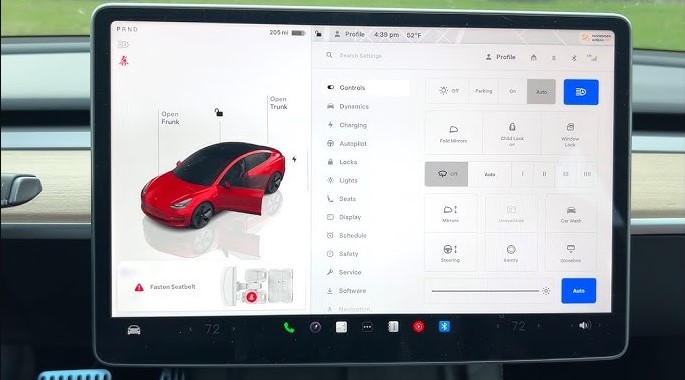
To enter Service Mode, go to your main screen and open the “Software” tab. Press and hold on the car’s name (the model name) for about three seconds. A box will pop up asking for a password. Type in “service” and hit enter. You will see a new menu appear. Please note: be very careful in this menu. It is intended for pros, so avoid changing any settings you do not understand.
Running the Battery Health Test
Once inside, look for the “Battery” or “High Voltage” section. You will find an option called “Battery Health Test.” When you select this, the car will tell you that the process takes a long time usually up to 24 hours. The car will drain the battery down and then charge it back to full to measure exactly how much energy it can store. This is the most accurate “gold standard” test for your specific vehicle. Only run this if you have the time to leave the car plugged into a wall charger for the duration of the test.
Leveraging Third-Party Apps for Data
If you don’t have 24 hours to spare, you can use third-party apps. These apps are extremely popular in the Tesla community in 2026. They connect to your car via the Tesla API or a physical OBDII diagnostic port to give you a clear picture of your battery health without needing to run a manual test.
Tessie: The All-in-One Tracker
Tessie is a fantastic app that tracks your Tesla 24/7. It provides a beautiful graph of your battery degradation over time. It compares your car to thousands of other Teslas of the same age and mileage, which is incredibly helpful. If your battery is degrading faster than the average car, Tessie will flag it for you. It is easy to use and provides peace of mind on a daily basis.
Scan My Tesla for Advanced Data
If you are a bit more of a “data nerd,” Scan My Tesla is the tool for you. It requires a small adapter plugged into the car’s diagnostic port under the center console. Once connected, it shows real-time data from the battery management system. You can see the temperature of individual battery modules and the exact health percentage. It is an amazing way to see exactly what is happening under the hood.
Smart Charging Habits for Longevity
The best way to maintain battery health is to prevent problems before they start. Even with the best tech, your daily habits have the biggest impact on your battery’s lifespan. By 2026, the guidance on how to treat your battery has become quite clear and straightforward.
The 80% Daily Habit
For daily driving, it is best to set your charge limit to 80% or even 70%. Lithium-ion batteries do not like being at 100% charge for long periods, as this increases the stress on the internal chemistry. Think of it like a rubber band; if you stretch it to its limit and leave it there, it eventually loses its snap. By keeping it in the “sweet spot” of 20% to 80%, you reduce stress and significantly slow down the degradation process.
Supercharging vs. Home Charging
Supercharging is an amazing convenience for road trips, but for daily use, home charging is much better for the battery. Supercharging pushes energy into the battery very quickly, which creates more heat. Heat is the enemy of battery life. Whenever possible, use a standard wall charger at home. It is slower, cooler, and much gentler on the cells over the long term.
Environmental Factors and Your Battery
Where you live and where you park make a big difference. Batteries are very sensitive to extreme temperatures. Understanding this will help you answer the question of how to check Tesla battery health, as the environment is often the “hidden” variable in your range numbers.
Dealing with Extreme Heat
If you live in a place with very hot summers, try to park in a garage or under shade. When a Tesla is parked in the sun, it uses energy to run the cooling system to protect the battery. If the car is kept cool, the battery management system doesn’t have to work as hard, which preserves your total capacity. In 2026, many models have improved thermal management, but it is still good practice to be mindful of the sun.
Winter Driving and Cold Soaks
Cold weather is a different story. In the winter, the battery is less efficient. You will notice a temporary drop in range when it is freezing outside. Do not panic! This is not permanent degradation. Once the temperature warms up, your range will return. To keep the battery healthy in winter, always keep it plugged in when it is cold. The car will use power from the wall to keep the battery warm, rather than draining the battery itself.
Conclusion: Keeping Your Tesla in Top Shape
Checking your Tesla battery health is a quick and easy process that provides a lot of value. Whether you use the built-in Service Mode, a user-friendly app like Tessie, or simply pay attention to your daily range, you are taking the right steps to be a responsible owner. As we look at the vehicles on the road in 2026, it is clear that these machines are built to last.
Remember that your Tesla is constantly learning and protecting itself. The software is smart, but your habits are the final piece of the puzzle. Stick to the 80% charge rule, keep the car cool in the summer, and enjoy the ride.
By following these simple tips, you can ensure that your Tesla remains a high-performance vehicle for years to come. If you ever feel concerned about the numbers, remember that Tesla service centers are always there to help with a professional diagnostic, but you have the power to monitor your car’s heartbeat right from your driver’s seat.
Frequently Asked Questions
How often should I check my battery health?
You really only need to check it once or twice a year. Unless you notice a sudden, drastic drop in your daily range, there is no need to monitor it more frequently than that.
Will fast charging ruin my battery?
Not if you do it correctly, but frequent Supercharging can contribute to faster degradation than slow home charging. Use Superchargers primarily for road trips to keep your battery chemistry in the best shape possible.
What is considered a “good” health percentage?
Anything above 85% to 90% after several years of ownership is generally considered excellent. Most batteries retain a high percentage of their capacity even after 100,000 miles of driving.
Does charging to 100% damage the battery?
Charging to 100% is fine occasionally, especially before a long road trip. However, leaving the car at 100% for many days at a time can accelerate degradation, so try to drive it shortly after it finishes charging.
Why does my range drop in the winter?
Cold weather temporarily reduces the chemical efficiency of the battery and requires more power to heat the cabin. This is a temporary drop, and your range will bounce back once the weather warms up.
Should I be worried about degradation?
Generally, no. Tesla batteries are designed to outlast the car itself in many cases. Focus on good charging habits and let the advanced onboard management system handle the rest.