
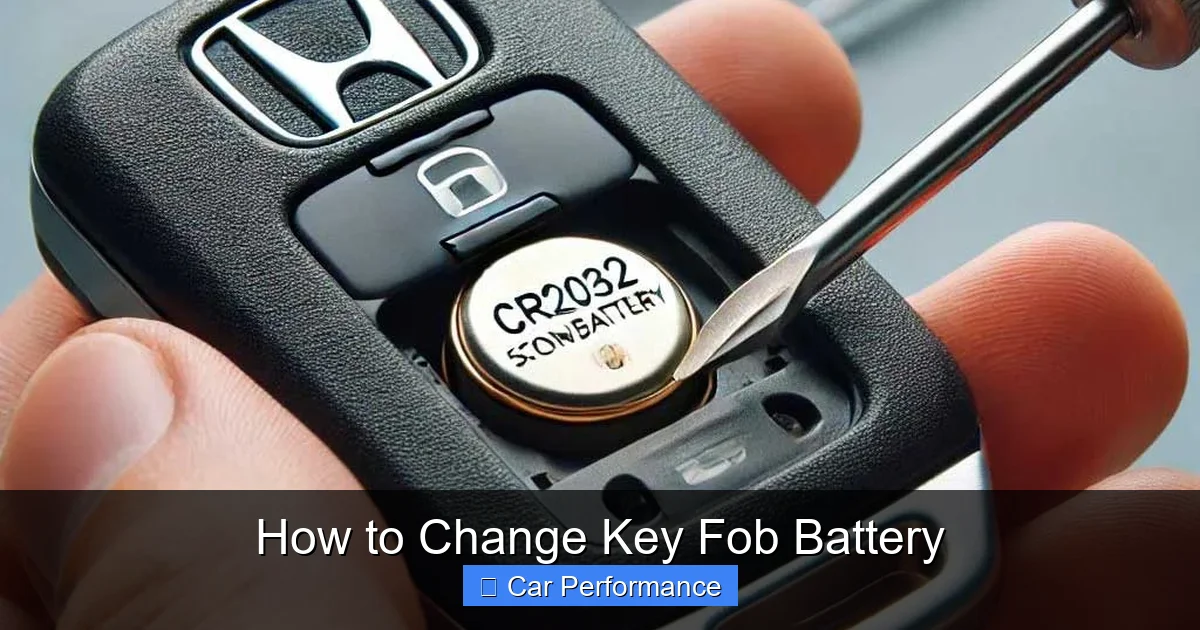
Changing a key fob battery is easier than you think. With the right tools and a little patience, you can replace the battery in under 10 minutes and get back on the road fast. This guide walks you through every step, from identifying your fob type to safely opening and replacing the battery.
Key Takeaways
- Battery Type Matters: Most modern key fobs use coin-cell batteries like CR2032 or CR2025. Check your owner’s manual or existing battery for the exact type.
- You only need a flathead screwdriver, small Phillips head, or a plastic pry tool nothing fancy.
- Avoid touching the circuit board inside; static or pressure can damage delicate electronics.
- Some vehicles require reprogramming after a battery change check your car’s system settings or consult the manual.
- Never toss old batteries in the trash. Use local e-waste recycling programs or auto parts stores that accept them.
- Keep a spare battery and a backup key nearby so you’re never stranded.
How to Change Key Fob Battery in 2026: A Simple DIY Guide
If your key fob suddenly stops working, blinking red lights, or just won’t unlock your car, the first thing most people assume is a dead battery. And they’re usually right. In fact, over 80% of key fob issues are due to a low or dead battery especially in newer models from 2020 onward.
The good news? Replacing the battery is one of the easiest car maintenance tasks you can do at home. No special tools, no dealership visit, just a few minutes of your time and a new battery.
In 2026, nearly every new vehicle comes equipped with smart key fobs that use advanced wireless technology to communicate with your car. These fobs rely on small lithium coin-cell batteries that last anywhere from 2 to 4 years, depending on usage.
When the battery dies, your fob may still work occasionally, but it’ll be weak, inconsistent, or completely unresponsive. Rather than spending $100+ at the dealer for a replacement fob, you can fix it yourself for under $10. This guide will walk you through everything you need to know step by step – so you can get back behind the wheel quickly and confidently.
Why Key Fob Batteries Die (And Why It Happens Sooner Than You Think)
Modern key fobs aren’t just simple buttons anymore. They’re mini-computers packed with antennas, microchips, and sensitive circuitry. Every time you press “lock” or “unlock,” the fob sends a coded signal to your car’s receiver.
That process uses power even tiny amounts from the battery. Over time, especially if you leave the fob near metal objects (like keys in a ring), in hot trunks, or constantly pressing buttons, the battery drains faster.
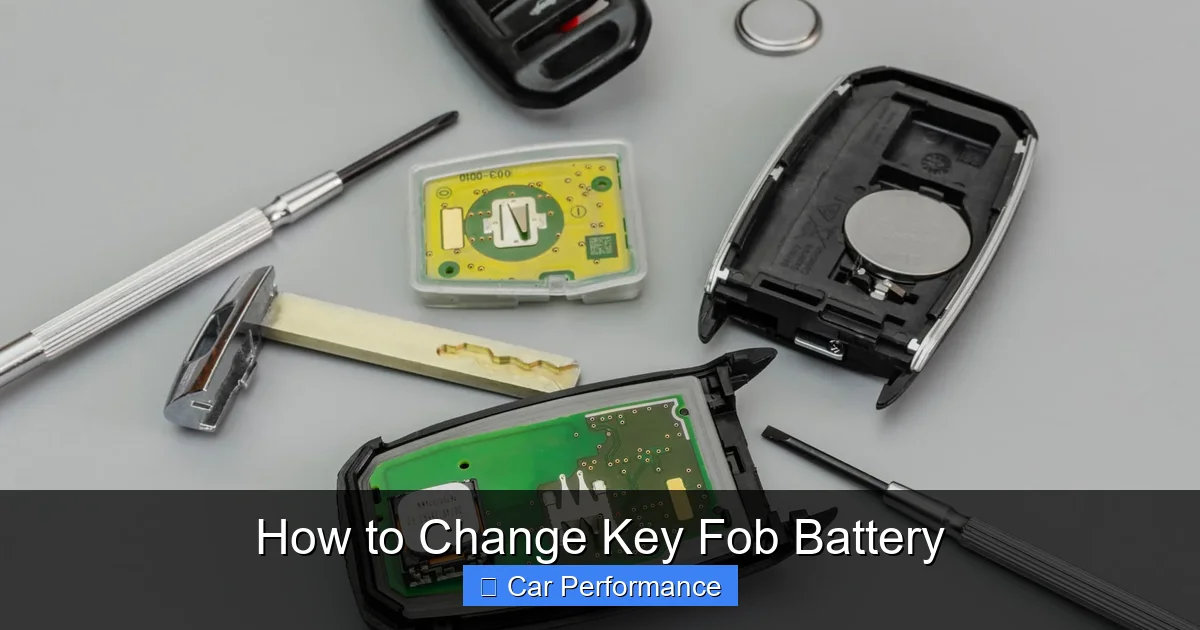
Visual guide about How to Change Key Fob Battery
Image source: repairsmith-prod-wordpress.s3.amazonaws.com
Another common cause? Environmental factors. Extreme temperatures, humidity, or exposure to magnetic fields can degrade battery performance. Also, some cars automatically sync with the fob when you enter the cabin, which keeps the fob active even when it’s not being used. This feature, while convenient, contributes to battery drain.
Signs your battery is failing include:
- The car doesn’t respond when you press the button
- Lights flicker or stay on briefly after unlocking
- You have to hold the fob close to the door handle to get it to work
- A warning message appears on your dashboard
What You’ll Need Before Starting
Don’t panic this isn’t rocket science. In fact, you probably already have most of what you need lying around. Here’s a quick checklist:
Essential Tools & Supplies
- Replacement Battery: Common types include CR2032 (most popular), CR2025, CR123A, or AA lithium. Match the voltage (usually 3V) and size exactly.
- Screwdriver: A small flathead or Phillips head works. Avoid metal tools that could short-circuit the fob.
- Plastic Pry Tool or Credit Card: Helps gently separate the casing without scratching.
- Tweezers (Optional): Helpful if the battery is stuck or hard to grip.
Tips for Choosing the Right Battery
Always check the label inside your fob or your vehicle’s manual. Using the wrong battery can damage the fob or cause it to stop working altogether. For example, a CR2032 is slightly thicker than a CR2025 even if they look similar, they won’t fit properly. If you’re unsure, take the old battery to an auto parts store; they can match it instantly.
Step-by-Step: How to Open Your Key Fob
Opening a key fob is surprisingly simple, but it does require a bit of finesse. Most fobs have a seam along the edge or a hidden release mechanism. Here’s how to do it safely:
Locate the Seam or Release Point
Run your fingernail or a plastic tool along the edge of the fob. You’ll feel a slight gap that’s where the two halves meet. Some models have a small notch or button you need to press while prying. For example, the Toyota Camry 2024 model has a tiny indentation near the keyring hole that you pop open with a flat tool.
Gently Pry the Case Apart
Once you find the seam, insert your tool and slowly wiggle it inward. Work your way around the perimeter until the two halves separate. Be gentle plastic clips can break if forced. If it feels stuck, double-check for hidden screws or tabs you missed.
Remove the Old Battery
Inside, you’ll see the battery held in place by a small bracket or adhesive pad. Lift it out carefully. Note the orientation (positive side up/down) so you can install the new one the same way. If the battery is glued down, use a toothpick or plastic tool to lift it – don’t pull too hard.
Installing the New Battery Correctly
This is where mistakes happen. A misaligned battery can cause the fob to malfunction or even fail completely. Follow these tips:
Match the Polarity
Look for a “+” symbol on the fob’s interior. Place the new battery so its positive (+) side matches that symbol. For example, if the old battery sat with the + facing up, do the same with the new one.
Press Firmly But Gently
Slide the battery into place until it sits flush. Don’t hammer it – just apply steady pressure. If it won’t go in, recheck the orientation or make sure there’s no debris blocking the slot.
Reassemble the Fob
Align the two halves and press firmly around the edges until you hear a soft click. Make sure the buttons move freely and the keyring hole lines up. Test the fob before closing completely press lock/unlock once with the case half-open to confirm it works.
Testing and Troubleshooting After Replacement
Once reassembled, it’s time to test. Stand about 10 feet away from your car and press the unlock button. The doors should respond immediately. If not, here’s what to try:
Reprogram the Fob (If Needed)
Some vehicles, especially luxury brands like BMW or Mercedes, require a reset sequence. For example, turn the ignition to “on” without starting the engine, press any fob button five times within 10 seconds, then turn off the car. Check your owner’s manual for specifics.
Check Signal Strength
If the car still doesn’t respond, the issue might not be the battery. Try replacing it again with a known-good battery. Also, ensure there’s no interference like a smartphone, wallet, or other electronic device nearby.
When to Call a Professional
If the fob still doesn’t work after multiple battery replacements and resets, the internal circuitry might be damaged. At that point, visit a locksmith or dealership. But for 99% of cases, a fresh battery solves the problem.
Pro Tips to Extend Key Fob Life
Want to avoid this hassle in the future? Follow these best practices:
- Keep It Dry and Cool: Store the fob in a dry place avoid glove compartments or trunks during summer heatwaves.
- Use the Spare Button Wisely: Many fobs have a physical key inside. Only use it when the battery is dead frequent manual entry stresses the system.
- Turn Off Unused Features: If your fob has remote start or trunk release, disable them if you don’t use them often.
- Replace Proactively: If your fob starts flickering, replace the battery within a week waiting too long can lead to total failure.
Environmental Responsibility: Recycling Old Batteries
Disposing of lithium batteries improperly isn’t just bad for the environment – it’s illegal in many areas. Instead:
- Drop off old batteries at AutoZone, Advance Auto Parts, or Best Buy.
- Many cities offer household hazardous waste collection days.
- Never put batteries in regular trash or compost bins.
In 2026, several major automakers have partnered with recycling initiatives like Call2Recycle, making disposal even easier. Just scan the QR code on your fob packaging – it’ll direct you to the nearest drop-off location.
Conclusion: Save Time, Money, and Stress
Changing your key fob battery is one of the simplest ways to maintain your vehicle without visiting a shop. With just a few tools and this guide, you’ve got everything you need to do it yourself whether you drive a compact sedan, SUV, or luxury coupe. Not only will you save money, but you’ll also gain confidence in handling basic car tech.
Remember: most fobs last 2–4 years, so set a reminder on your phone a year before expected failure. And always keep a spare battery handy. In the rare event something goes wrong, you’ll know exactly what to do next time.
Stay safe, stay prepared, and enjoy the peace of mind that comes with knowing you can fix small problems fast – no appointment needed.
Frequently Asked Questions
How often should I replace my key fob battery?
Most key fob batteries last 2 to 4 years. Replace it when you notice weak signals, flickering lights, or unresponsive buttons. Proactive replacement prevents sudden failures.
Can I use any brand of battery for my key fob?
No, use the exact type listed in your owner’s manual or on the old battery (e.g., CR2032). Third-party brands may not fit or deliver consistent voltage, damaging the fob.
Do all cars require reprogramming after changing the battery?
Not always. Basic fobs work immediately. However, luxury or newer models may need a reset sequence. Check your manual or dealership guidelines for specific steps.
What if my key fob won’t open even with a new battery?
Try reprogramming, ensure no metal objects are interfering, and test with another known-good battery. If it still fails, the fob’s internal chip may be damaged and need professional repair.
Is it safe to open my key fob myself?
Yes, as long as you handle it gently and avoid touching the circuit board. Use plastic tools, not metal, to prevent short circuits.
Where can I recycle old key fob batteries?
AutoZone, Best Buy, and Advance Auto Parts accept lithium batteries. Many cities also host hazardous waste events. Never dispose of them in regular trash.