
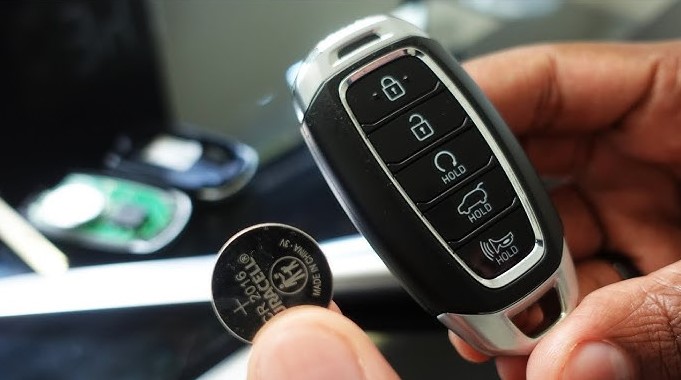
If your car remote is acting up, you likely just need a fresh battery. This guide shows you exactly how to replace battery in Hyundai key fob models quickly and safely, saving you a trip to the dealership.
There is nothing quite as frustrating as walking out to your Hyundai, pressing the unlock button, and getting absolutely no response. In the year 2026, we rely on our smart keys for everything from starting the engine remotely to popping the trunk with a single touch. When that signal dies, it can feel like your day has come to a grinding halt. However, you do not need to call a mechanic or head to the dealership service center just yet.
Learning how to replace battery in Hyundai key fob devices is a simple skill that every car owner should have in their back pocket. It takes about five minutes, requires almost no specialized tools, and costs only a few dollars for the battery itself. In this guide, we will walk you through the process so you can get back on the road with confidence.
Key Takeaways
- Identify Your Battery: Most modern Hyundai fobs use a standard CR2032 lithium coin cell battery.
- Tools Required: You only need a small flat-head screwdriver or a sturdy coin to pop the casing open safely.
- Avoid Scratching: Use a cloth over your tool to protect the plastic shell of the key fob from marks.
- Check Contacts: Ensure the metal prongs are clean and making solid contact with the battery surface for best performance.
- Synchronization: Usually, no reprogramming is required after a battery swap, but test it near the car first.
Understanding Your Hyundai Key Fob Anatomy
Before you start prying things apart, it is important to understand what is inside your remote. Most Hyundai vehicles manufactured in the last decade utilize a similar internal architecture for their key fobs. At the heart of the device is a small circuit board and a coin-style lithium battery. This battery provides the low-voltage power needed to transmit the radio frequency signal to your vehicle’s receiver.
Recognizing the Low Battery Signs
Your car is actually pretty smart. Often, the vehicle will give you a warning on the dashboard display when the key fob battery is getting low. If you notice that you have to stand closer to the car than usual to get it to unlock, or if the light on the fob itself seems dim, it is time for a change. Ignoring these signs can lead to being locked out, especially if your vehicle requires a proximity signal to start the ignition.
Selecting the Correct Replacement
In 2026, the industry standard remains the CR2032 3-volt lithium battery for almost all Hyundai fobs. While it is tempting to pick up a generic brand at the checkout aisle, we highly recommend using a name-brand battery. These tend to have a longer shelf life and better voltage consistency, which prevents you from having to repeat this process sooner than necessary.
Step-by-Step Guide: How to Replace Battery in Hyundai Key Fob
Now that you have your new battery and a small flat-head screwdriver, let us get to work. The process is straightforward, but you should always work on a clean, flat surface like a kitchen table so you do not lose any tiny screws or springs that might jump out.
Removing the Mechanical Key
The first step in learning how to replace battery in Hyundai key fob is to remove the physical emergency key. Look for a small button or a slider on the side of the fob. Press it down and pull the metallic key blade out. This piece acts as a handle for opening the main plastic shell. You will see a small slot on the side of the fob where the key was housed.
Prying Open the Shell
Insert your flat-head screwdriver or the tip of your emergency key into the seam of the fob. Carefully twist the tool to pop the plastic housing apart. Go slowly. You want to hear the plastic tabs release without snapping them. Once the two halves are separated, you will see the internal circuit board and the battery held in place by a small metal clip.
Tips for a Safe and Successful Swap
When you are performing the actual replacement, treat the circuit board with care. These components are sensitive to static electricity and oils from your fingers. Try to touch the edges of the board rather than the metallic pathways.
Handling the Metal Retainers
The battery is often secured by a metal clip. If you use your screwdriver to gently lift the edge of the battery, it should pop right out. Be very careful not to bend the metal prongs too far. If you warp them, they might not hold the new battery firmly, which would lead to an intermittent connection and a fob that works only half the time.
Cleaning the Contacts
Since you have the fob open, take a moment to look at the metal contacts. If you see any white residue or dust, wipe it away with a dry, lint-free cloth. This ensures that the new battery can send power efficiently to the board, giving you the best possible range for your key fob signal.
Common Troubleshooting and Pro-Tips
Sometimes, even after you replace the battery, the fob still seems sluggish. This is usually due to environmental factors or the way the device was assembled. If you find yourself wondering how to replace battery in Hyundai key fob effectively, remember that the smallest details matter most.
What to Do If the Fob Won’t Start the Car
If you have installed a fresh battery and the car still won’t respond, hold the key fob directly against the Start/Stop button. Many Hyundai models have an RFID backup sensor that allows the car to detect the key chip even if the battery is completely dead. This is a great trick to get you home if your battery dies while you are out and about.
Ensuring a Tight Seal
When snapping the case back together, check that no wires are pinched. Squeeze the two halves together firmly until you hear a clear “click” all the way around the edge. If the case does not sit flush, a little bit of moisture could seep in over time and damage the electronics.
Why DIY is Better than the Dealership?
Going to the dealership to have a battery replaced is often a waste of time and money. Service centers are busy, and they may charge a premium just for the labor of opening a plastic case that you can easily open yourself. By mastering how to replace battery in Hyundai key fob, you reclaim your autonomy. It is a simple piece of car maintenance that makes you a more capable owner.
The Environmental Impact
When you dispose of your old battery, please do not throw it in the regular trash. Coin cell batteries contain lithium and other chemicals that are better kept out of landfills. Most hardware stores and electronics retailers have small collection bins where you can drop off used batteries for proper recycling. It is a small step that makes a big difference for the environment.
Conclusion
Learning how to replace battery in Hyundai key fob units is a rite of passage for every modern driver. It removes the anxiety of a dead fob and saves you from unnecessary service fees. By following the steps outlined here, you can ensure your Hyundai remains reliable and ready to go whenever you are.
Keep a spare CR2032 battery in your glove box, and you will never be left stranded by a dead remote again. Stay prepared, stay informed, and enjoy the convenience of your Hyundai technology.
Frequently Asked Questions
How often should I change my Hyundai key fob battery?
Typically, a key fob battery lasts between two and three years depending on usage. If you notice your remote range decreasing or the car takes longer to respond, it is time for a change.
Will I need to reprogram my key after replacing the battery?
In most Hyundai models, the key fob retains its memory even when the battery is removed. You generally do not need to reprogram the remote after a simple battery swap.
Can I use any coin battery for my key fob?
No, you must use the specific size and voltage indicated in your owner’s manual or printed on the old battery. Most Hyundai fobs use a CR2032, but always check to be sure.
What if I damage the key fob casing while opening it?
If you accidentally crack the plastic shell, you can usually buy a replacement fob case online for a low price. You can simply transfer the internal circuit board into the new housing.
Why is my fob still not working after changing the battery?
If it still fails, ensure the battery is facing the correct direction, usually with the positive (+) side facing up. If it still doesn’t work, the circuit board may be damaged and require professional inspection.
Can I replace the battery at a gas station?
Yes, many convenience stores and pharmacies carry the common CR2032 battery. You can perform the replacement right in your car parking space in just a few minutes.