
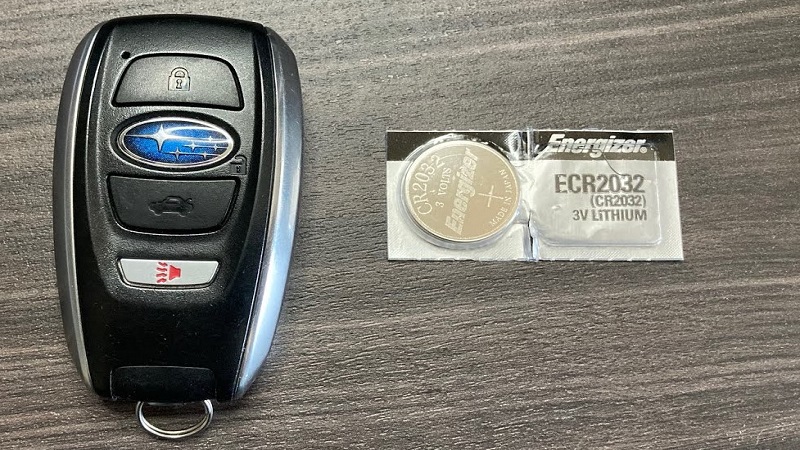
Changing your Subaru key fob battery is a simple, five-minute DIY task that saves you a trip to the dealership. By following our step-by-step guide, you can swap out the depleted cell, restore full range to your remote, and ensure your vehicle remains secure and accessible in 2026.
There is nothing quite as frustrating as walking up to your Subaru on a rainy morning, pressing the unlock button, and finding absolutely nothing happens. We have all been there. Whether you drive a rugged Outback, a zippy Crosstrek, or a reliable Forester, your key fob is the silent gateway to your journey. As we navigate through 2026, our vehicle technology is becoming smarter, but even the most advanced systems still rely on a tiny, replaceable power source to keep you moving.
If your car is not responding to your key or if you see a “Key Fob Battery Low” warning on your dashboard, do not panic. You do not need an expensive trip to the service center or professional mechanical skills to fix the issue. Learning how to change battery in Subaru key fob is one of the most useful skills for any car owner. It takes just a few minutes, costs only a few dollars for a battery, and puts you back in full control of your vehicle.
Key Takeaways
- Identify Your Battery: Most modern Subaru models use the CR2032 lithium coin battery, but always check your manual first.
- Tools Required: You only need a small flat-head screwdriver or a thin coin to open the housing safely.
- Avoid Damage: Gently pry the casing at the designated notches to prevent scratching the plastic or damaging internal components.
- Handle with Care: Avoid touching the flat sides of the new battery with bare fingers, as oil can interfere with the electrical contact.
- Test Immediately: Always test the lock and unlock functions before snapping the casing shut completely.
- Proactive Maintenance: Replace your battery every 18–24 months to avoid getting stranded with a dead remote.
Understanding Your Subaru Key Fob Architecture
Before you start prying things open, it helps to understand what is happening inside that plastic shell. Modern Subaru key fobs are marvels of engineering, packed with radio frequency transmitters and security chips.
The battery, usually a coin-shaped lithium cell, is the lifeblood of this device. When it fades, the signal weakens, forcing you to stand closer to your car until, eventually, the signal disappears entirely.
Common Battery Types
While the vast majority of Subaru vehicles produced up to 2026 utilize the industry-standard CR2032 3V lithium battery, it is always wise to double-check. Some older models or specific international trims might occasionally use a CR1620. You can typically find this information printed on the inside of the casing once you open the fob. Buying a name-brand battery rather than a generic knock-off can also significantly extend the time before you need to learn how to change battery in Subaru key fob again.
Recognizing the Warning Signs
Your Subaru is actually quite good at communicating with you. If you notice that you have to press the buttons multiple times, or if the “Lock” or “Unlock” range has drastically shrunk, your battery is likely on its last legs. Furthermore, if you own a 2026 model, the digital instrument cluster will often display a specific alert warning you that the key fob battery is low. Paying attention to these signals will save you from the embarrassment of being stuck in a parking lot.
Tools and Preparation for the Task
One of the best parts about this maintenance task is how little you need to get it done. You do not need a toolbox full of heavy equipment. In fact, most people have everything they need sitting in their junk drawer right now. Having the right tools ensures that you do not damage the delicate plastic clips that hold the key fob together.
Visual guide about How to Change Battery in Subaru Key Fob
Image source: i.ytimg.com
The Essential Toolkit
To successfully complete the battery swap, gather a small, flat-head precision screwdriver. If you do not have one, a sturdy, thin coin—like a nickel or a flat-edge pry tool—will work perfectly. You will also need a clean, flat surface, like a kitchen table, where you can easily see the small internal components. Keeping a soft cloth down on the table can also help prevent the fob from sliding around while you work.
Handling the Components
When you open the fob, you will see a circuit board and a rubberized button pad. Be extremely gentle with these parts. They are designed to withstand normal pocket wear and tear, but they are not made to be poked with sharp metal objects. Always aim for the edges of the casing when prying. If the case feels stuck, do not force it. Reassess your angle and try a different point along the seam.
Step-by-Step: How to Change Battery in Subaru Key Fob
Now that you are prepared, let us dive into the actual process. The procedure is largely the same across the current Subaru lineup, though the specific shape of your fob might vary slightly. Take your time; there is no prize for finishing in ten seconds, but being careful will ensure your fob stays in pristine condition.
Removing the Mechanical Key
Almost every modern Subaru smart key features a hidden mechanical blade. You will see a small release button or a switch on the side or back of the fob. Slide that switch and pull the metal key out. This step is mandatory because it often covers one of the screws or prying points needed to split the case. Once the metal key is out, look for the notch where it was housed. This is usually the best place to insert your screwdriver to pop the case open.
Splitting the Casing
Insert your flat-head screwdriver or coin into the seam near the keyhole. Slowly twist your tool. You should hear a soft “pop” as the plastic clips release. Work your way around the edges, gently prying until the two halves of the fob separate. Be careful not to let the internal rubber buttons fall out; if they do, just set them aside and note their orientation so you can place them back correctly later.
Swapping the Battery
Once the fob is open, you will see the battery nestled in a holder. Use your screwdriver or a fingernail to gently nudge the battery out. Note the orientation; the “positive” side (usually marked with a +) should be facing in a specific direction check the imprint on the plastic or the way the old battery was sitting. Slide the new CR2032 battery into place. It should click in snugly. Avoid touching the face of the new battery with your skin; the oils from your fingers can reduce conductivity over time.
Final Assembly and Testing
With the new battery seated, it is time to put everything back together. Align the two halves of the key fob and press them together firmly. You should hear a series of clicks as the plastic tabs lock back into place. It is a very satisfying sound, signaling that you have successfully completed the repair.
Testing Your Work
Before you snap the mechanical key back into its housing, take the fob out to your car. Press the “Lock” and “Unlock” buttons. If the lights flash and the locks click, you have done it! If it does not work, do not worry. Open the case again, ensure the battery is seated firmly, and check that the rubber button pad is properly aligned. Sometimes a button simply slips out of place during the final closing process.
Reinserting the Mechanical Key
Once you are sure everything is functioning, slide the metal key back into the slot until it clicks. Your key fob is now as good as new. Not only have you saved money, but you have also gained the peace of mind that comes with maintaining your own vehicle. It is a quick, easy win that keeps your Subaru running smoothly.
Troubleshooting Common Issues
Sometimes, things do not go exactly to plan. If you find that the new battery is in but the car still refuses to respond, there are a few common culprits to investigate. Most of these are very easy to fix without needing a professional mechanic.
Dealing with Persistent Signal Issues
If the remote still fails, verify the battery is the correct voltage. Sometimes, cheap batteries sit on store shelves for years and have lost their charge. Try a fresh battery from a different pack. Also, check the metal contact prongs inside the fob. If they look bent or dirty, use a Q-tip with a tiny amount of rubbing alcohol to clean them. A gentle nudge to straighten out a bent prong can often restore the connection instantly.
What If You Damage the Casing?
If you were a little too forceful and managed to chip the plastic, do not despair. Most Subaru key fob cases can be replaced. You can buy “shell replacements” online that allow you to move your existing circuit board into a brand-new plastic housing. This is much cheaper than buying a whole new key fob from a dealer and getting it programmed. Keeping your fob in a leather or silicone cover can also protect the casing from future damage and drops.
Conclusion
Learning how to change battery in Subaru key fob is one of those essential life skills that pays off every single time you need to hit the road. It transforms a potentially stressful, “I’m stranded” moment into a simple, two-minute maintenance task. By taking control of your car’s basic needs, you foster a better relationship with your vehicle and save precious time and money in the process.
As we continue through 2026, keep this guide handy. Whether it is your Subaru or a friend’s, you are now the go-to expert for quick key fob repairs. Remember: be patient, use the right tools, and keep your components clean. With these simple habits, your Subaru key fob will remain a reliable, efficient tool that keeps you connected to your car for years to come. Happy driving!
Frequently Asked Questions
How often should I change my Subaru key fob battery?
You should typically replace your key fob battery every 18 to 24 months. If you use your remote frequently or live in an area with extreme temperatures, you may find that the battery life is slightly shorter.
Can I use any coin battery for my Subaru key fob?
No, you must use the specific battery size required by your key fob, which is usually a CR2032. Check your owner’s manual or the markings on the old battery to ensure you have the correct voltage and size before installing.
Will I need to reprogram my key after changing the battery?
In most cases, no. Subaru key fobs are designed to retain their pairing information even when the battery is removed for a short period, so the fob should work immediately once the new battery is in.
What should I do if the new battery does not work?
First, ensure the battery is inserted in the correct orientation with the positive side facing the correct way. If it still fails, try cleaning the metal contacts with a bit of rubbing alcohol or testing the fob with a second fresh battery.
Can I damage my key fob by opening it myself?
While the process is straightforward, using too much force or the wrong tool can scratch the plastic or bend the internal tabs. Always work slowly and use a flat, thin tool to distribute pressure evenly along the seams.
Does the cold weather affect my key fob battery?
Yes, lithium batteries can lose voltage in extreme cold, which might cause your remote to become temporarily unresponsive. If your car sits in freezing temperatures, you might notice your fob acting up until it warms up inside your pocket or vehicle.